Preview emails Genesys can't display, plus a threat alert you can't miss
With full character-set support, Mediabriz can now show customer emails that Genesys can't render, and for teams using Mediabriz Guard, a new pop-up alert makes sure a flagged file is never missed.
This update is all about clarity in the moments that matter: reading what a customer actually sent, even when Genesys can’t show it, and never missing a file that isn’t safe.
Preview emails Genesys can’t display
Some customer emails arrive using character sets that Genesys can’t render, leaving agents staring at broken or unreadable text. A common example is an “Undeliverable” notification, which carries the customer’s original message as a raw email attachment.
Mediabriz now reads those messages in full. Because our previewer supports the complete range of character encodings, including ones Genesys doesn’t handle, it can display emails that Genesys simply can’t. The message opens as a clean, readable email, the decoded body with any inline images and attachments listed and ready to download, instead of raw code or garbled characters.
A few details agents will appreciate:
- Full character-set support. International and multilingual messages, including right-to-left languages such as Hebrew, render correctly, exactly as the customer sent them.
- Clear labeling. When the file is just the message body on its own, Mediabriz marks it with an “Original email message” badge, so it’s obvious what you’re looking at.
The result: no customer email goes unread, even the ones Genesys can’t open, so agents resolve them faster without ever leaving Mediabriz.
A threat alert you can’t miss
For teams using Mediabriz Guard, threat awareness gets an extra layer. Alongside the calm halo that already appears on the side tab, there’s now an active alert for the moment that matters most.
When the Mediabriz window is closed and a file in the conversation you’re focused on comes back flagged as unsafe, a red alert slides in at the top of the screen. One click on Review in Mediabriz opens the conversation so you can handle the file safely, instead of downloading it from Genesys.
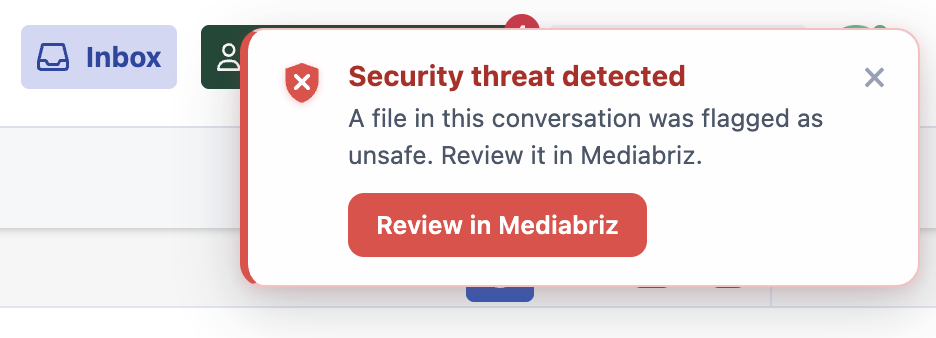
It’s a one-time, deliberate nudge, designed to catch your eye without adding noise, working hand in hand with the quieter side-tab cues. (Available for organizations with Mediabriz Guard enabled.)